How to find an old Bitcoin wallet: where to search, how to handle what you find, when to ask for help
Published: Last reviewed: How we edit
Finding an old Bitcoin wallet means searching for three things: wallet files like wallet.dat, devices and backups that could hold them, and written recovery words or old emails from an exchange. Keep the computer offline while you search, work from copies, and check balances only through public addresses. If a drive is damaged or a file is locked, let a specialist handle repairs instead of trying yourself.
Not sure what to do next? Write to us:
First, know what you are searching for
Bitcoin itself never expires. Coins you bought long ago are still sitting at their addresses on the blockchain. What you actually need to find is the secret that controls them. That secret might be a wallet file, something stored on a device, a printed sheet, a list of words, or simply the login for an exchange account.
Figure out which kind you most likely had. Ask yourself when you bought, where, and how you kept it. Buying through an exchange points to an account. A desktop program points to a file. A small hardware device points to written recovery words. Then start collecting clues.
- Messages from exchanges or wallet services, such as welcome, confirmation and withdrawal emails.
- Bank, card or payment statements showing that you bought Bitcoin.
- Old notes, notebooks, printouts, or photos of written notes.
- Saved logins in your password manager, stored browser credentials, and old messages with people you trust.
- A list of each computer, phone, tablet and drive you used back then.
Finding Out the Different Wallet Types and Where They Might Be Located.
Because every program, version and operating system organizes files its own way, look for keywords and file names too, not only folders. The table shows patterns you will often see; it is not a complete list. Be careful with names alone: wallet.dat is used by other coins as well, and a file with that name may hold nothing.
| Kind of wallet | What to check first | Where the wallet often turns up |
|---|---|---|
| Bitcoin Core, plus the older Bitcoin-Qt | Look for a file called wallet.dat, or a folder containing it. | Check the hidden program data folder within your user profile. |
| Electrum | Find wallet files that lack an obvious extension, usually located in a wallets folder. | Look in your user profile for a folder named Electrum or .electrum. |
| MultiBit | Search for files with .wallet or .key extensions, as well as any backup copies. | Examine a MultiBit folder in your user profile, or look through backups. |
| Account with a web wallet | Locate a wallet ID in an older email or find the necessary account password. | Mailbox, password manager, or logins saved in your browser |
| Mobile wallet app | Check the app itself, or any recovery phrase shown in its settings. | Check any old phones or tablets, along with their cloud or computer backups. |
| Hardware wallet | This is a small device, sometimes including a card or sheet with recovery words. | Search drawers, safes, or deposit boxes for written backups kept separate. |
| Paper wallet | Look for a printed sheet containing long strings of characters or QR codes. | Examine folders, safes, or print jobs, including old PDFs inside boxes. |
| Account on an exchange | Emails confirming purchases, account statements, notices of withdrawals | Your mail, plus bank or card records showing what you bought |
Where to look on drives and backups
Wallets you lost track of tend to sit in spots you quit looking at years back. Check the plain folders first, then widen out to every backup you can recall making.
Let the system search look for file names like wallet.dat and for words like bitcoin and electrum, and turn on hidden files. Search a copy of the drive, never the drive itself.
- Old desktops, laptops and tablets stored in a closet, an attic or a family member's home.
- External drives, USB sticks, memory cards and storage on your home network.
- Backups of your devices, like a saved copy of your phone, a Mac backup disk, or a Windows backup folder.
- Cloud storage and synced folders, plus email attachments you mailed to yourself as a spare copy long ago.
- Wallet software often stored its files inside hidden data folders in your user profile. That is one place worth checking first.
- Paper is another spot: look in safes, safe deposit boxes, books and old paperwork.
What to do with what you find: copies first, always offline
The original comes first. Before you open anything, copy each file or drive, and leave the original untouched somewhere safe. Everything you do, do on the copy.
The second rule: keep the machine offline. Unplug the computer from the internet while you look at the copy. Older drives can carry malware, and wallet programs may sync or send data without warning. Also skip recovery tools found via search results or ads.
Was something deleted? Then stop using that drive right away. Writing new data can erase what you want back. Never run repair or undelete programs on the original. A specialist can first make an exact image of it.
- Keep wallet files, recovery phrases and keys off any website. Balance checker tools count too.
- Never type recovery words or keys into a search bar or a chat, even when asking for help.
- Write a plain note as you go: what turned up, the place and date, and the step you took next.
- Label each copy so you know what it is, and keep one spare on a separate device.
Check for Funds While Protecting Your Private Information
Addresses on the blockchain are public information. If you have a list of addresses, use a block explorer to see the history and current balance. Finding coins there confirms they exist. It does not prove you still control the keys. Please conduct this check using a device separate from the one you used before, and write down only the addresses.
Do not type any private phrases or keys into any balance tool or explorer. If you locate written recovery words, restore them only within the official wallet program from the maker. Use a clean device for this process, and then check the first address it shows against one you recognize.
After you confirm the funds are available, plan to move them to a new wallet you have set up. You must also create a fresh backup copy. Please collect your purchase records first, because sending old coins to an exchange might cause them to question the source of the funds.
What To Do If Your Wallet Is Locked, Damaged, or Lost
A wallet file might ask for a password you can no longer recall. A drive may fail to power on, or a file could be corrupted. These are technical matters. Every incorrect attempt decreases the odds of success, so please proceed slowly. If you see any signs below, stop and reach out to a specialist.
- The drive does not power up, is making unusual sounds, or reports operational errors.
- A wallet file asks for a password, but you only remember parts of the required code.
- You have a deleted file, or the drive has been erased or reformatted.
- The file or device is in a format that you do not recognize.
- A big amount, or an old device that's also evidence in a legal case or an inheritance.
Getting help from an expert, and steering clear of the wrong people
Independent specialists can make an image of a damaged drive, recover files you thought were gone, and try likely passwords on a copy of the wallet file. A good engagement comes with a written scope, works on copies only, leaves the funds in your control, and never asks for your seed phrase. Success fees are common, but terms vary, so read them before you agree to anything.
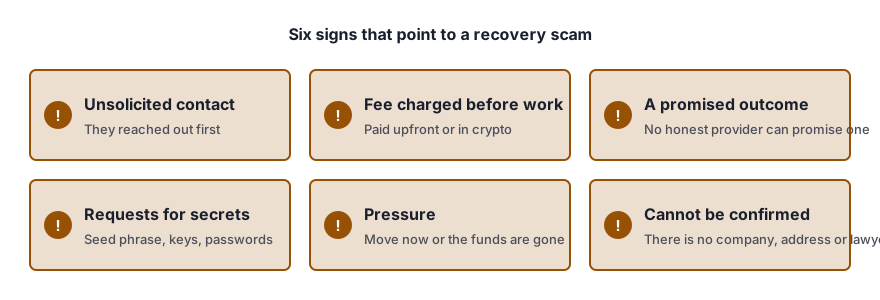
Be careful with anyone who contacts you first, asks for money before reviewing your case, wants remote access to your device, or claims they cannot fail. This part matters: if someone says they can see your lost Bitcoin and just need a fee to release it, that is a scam.
If a route exists, we will tell you plainly, in writing, whether it looks realistic. If it does, we coordinate independent specialists to work through it with you. Checking what you have costs nothing, and fees only come up after we know whether we can help. Nobody can promise a wallet will be found or opened, and we will never ask you to share a seed phrase, private keys or passwords.
Questions people ask
After all these years, is the Bitcoin in my old wallet still sitting there?
This is a stressful concern, but you must know this plain fact. Digital coins do not expire. They stay at their addresses as long as the network continues to run. What can be lost is your access to them. This happens if a file, a device, or written words are lost. The practical question we face together is finding the secret that controls your assets.
Is there a way to see what an old address holds now?
You can check a public address in a block explorer. Addresses are public information, so this step is safe. Never share your seed phrase or private key. Any balance checker that asks for them is not trustworthy. A balance tells you coins are there. It does not mean you can still move them.
If a file is called wallet.dat, does that mean Bitcoin is inside it?
No, not by itself. Some other coins share that file name, and the wallet may hold nothing or just a little loose change. Think of it as a clue, not proof. Save a copy and let someone with experience look at it before you decide anything.
Could I put the old wallet program back on and open the file that way?
You may, but work from a copy, keep the machine offline, and download only from the maker's own site. A few programs rewrite the wallet file as they open it. That is the reason you keep the untouched original stored safely.
Is it worth bringing the old computer to a shop that recovers data?
First, ask what they plan to do with the drive and the information on it. Get the scope in writing, request that they work from an image, and never pass along a password or seed phrase. Any shop that knows wallets will accept those terms.
How we can help
- Recovering a wallet password or file. Lost password or broken file: screened independent specialists attempt recovery.
- Assistance for Hardware Wallet Recovery. Lost PIN, damaged or missing hardware wallet: plain options and checked independent labs.
- Getting back into crypto accounts and passing them on. Lawful crypto access after death or incapacity, coordinated by our team with independent lawyers.
- Packs for source of funds and wealth. We can help you compile clear documentation showing your source of funds and wealth for banks and exchanges.
This page gives general information only. It is not legal advice.