Trezor Backup or PIN Issues: What the official Trezor documentation explains.
Published: Official pages last read: How we edit
We understand this is overwhelming. Trezor states that you restore your wallet using the recovery seed, which is entered only when the physical device prompts you. If you forgot your PIN, the process involves a factory reset and then using your backup. Trezor says they cannot help recover a wallet if the backup itself is lost and the funds are inaccessible.
We have no connection to Trezor. We are a separate service, we cannot sway its decisions, and nothing here comes from Trezor officially.
Not sure what to do next? Write to us:
What the platform's own pages say
- Recovery uses a wallet backup, previously known as the recovery seed. Trezor advises entering this information only when the physical device directs you to do so and you confirm it there. [1]
- If you forgot your PIN, the steps are to factory reset the device and then restore the wallet using the backup. Note that a reset in bootloader mode deletes the firmware and all private information. [1]
- If you find a brand new device that already has firmware installed, do not continue. Unplug it and contact Trezor Customer Support to discuss getting a replacement. [1]
- Trezor notes the device displays the wallet backup only once. A disconnection during this process results in an incomplete backup, which requires you to erase the device and begin setup again. [2]
- Losing your backup is stressful. If your wallet is accessible, move those funds to a different wallet with a known backup. [2]
- This is a limitation. Trezor cannot recover the funds if the backup is lost and you cannot access the wallet. [2]
- On its PIN page, Trezor explains that the PIN stops anyone who gets hold of the device physically from using it. It also states that 10 wrong tries on the Safe 7, or 16 on the Safe 5, Safe 3, Model T and Model One, will reset the device and erase the wallet. [3]
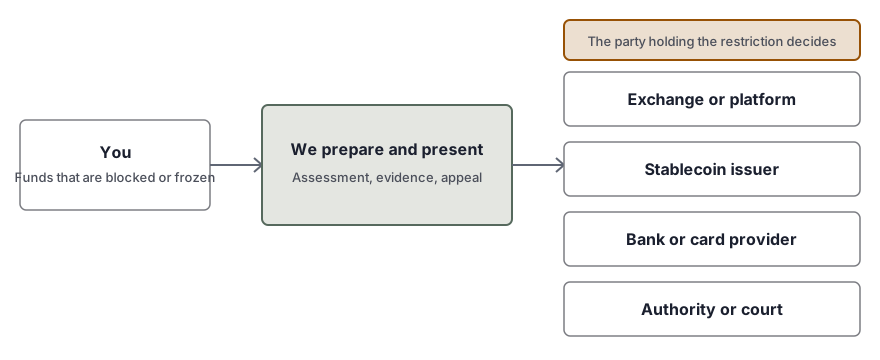
Common restrictions
| Type of restriction | What it means |
|---|---|
| You Forgot Your PIN | Trezor says to reset the device first, then restore from your backup. This clears all private data on the device. Without the backup, nothing can be recovered. |
| Problematic or Failed Backup | Trezor shows the backup one single time. If the device disconnects mid-backup, there is no way to see it again. Trezor's own advice is to wipe the device and begin setup from the start. That is simple before any coins are on it, and much harder after. |
| Missing or Lost Wallet Backup | We ask that you move your funds to another wallet if you have access. If access is impossible, Trezor cannot recover it. |
| Devices Used Previously | Here Trezor is clear: if the new device already ships with firmware on it, stop setup right there. Unplug it and reach out to customer support to get a replacement. |
What you can do, one step at a time
- Check if the wallet still opens
Being able to open the wallet with the device and your PIN changes the picture. The backup becomes the pressing matter, not the funds. For now, do not wipe the device.
- Wallet opens but backup is gone? Move funds
Trezor advises moving your funds to another wallet that has a backup you know, and doing it soon. Set up a new wallet with a fresh backup, then send the funds over with care.
- Look for your wallet backup
Your recovery seed should be written down somewhere offline. That written copy is what lets you restore the wallet if the device goes missing, gets wiped, or breaks.
- Reset and recover on the device only
Forgot the PIN? Trezor says to do a factory reset, then recover from your backup. Type the words only when the physical device asks for them, and confirm right on the device.
- Do not type your seed into any website or message.
Here is what Trezor asks you to do: enter your backup only on the device itself, when the device tells you to. A message from anyone else asking for it, no matter who they say they are, should be ignored.
- Reach Trezor support for hardware problems
If your Trezor device shows signs of fault or suspicion, please check their official support channels first. You should use their verified pages to reach them. Remember, they have stated that they cannot recover a lost backup for you.
What to have ready
- Which Trezor model you own, and roughly when you set it up
- Your written backup, kept offline and typed only on the device
- The addresses and balances you can look up on a block explorer
- Any error messages or setup prompts you have screenshots of
- Where you keep the backup and the PIN, and how
- If the device was stolen, the police report number
Pitfalls and scams to stay away from
- Nobody, including someone claiming to be Trezor support or a recovery service, should ever be given your wallet backup, seed, private keys, PIN or passwords.
- Trezor's rule is simple: the backup goes in only when the physical device itself asks. If a website or chat requests it, that is a scam.
- Turn away anyone who messages you first offering backup recovery. Trezor says it has no control over your backup and cannot recover it.
- Skip any device that comes set up out of the box. Trezor advises you to stop and reach out to support.
When outside help is worth it
- You lost the backup and can no longer open the wallet, and you want to see what options may still exist
- A damaged device calls for a specialist you can verify, not a flashy ad
- You typed your backup into a fake site and lost funds, and the evidence now needs sorting
- You are handling the wallet of someone who has died or cannot act themselves
Questions people ask
How do I get back into a Trezor when I forgot the PIN?
The recovery guide from Trezor says to factory reset the device, then restore your wallet using the wallet backup. Keep in mind that a reset done in bootloader mode wipes the firmware and every private detail, so the backup must be in hand first.
Can Trezor restore a wallet backup I have lost?
No. According to Trezor's troubleshooting page, if the backup is gone and the wallet is unreachable, it cannot assist with recovery. It has no control over the backup, and losing it means access is gone for good.
What can I do if the backup is lost but the wallet still opens?
First, Trezor advises moving your funds to a different wallet you already trust. Use a known backup to do this safely. Do not wipe the device yet. Follow Trezor's instructions when creating a new wallet and moving the assets.
What happens if you enter the wrong PIN too many times?
This is stressful, but the limits are specific. Trezor states the Safe 7 resets after 10 incorrect attempts. For Safe 5, Safe 3, Model T, and Model One, it resets after 16 attempts, erasing the wallet. You must have the backup to restore access after this reset.
Can I safely enter my wallet backup details on a website for recovery?
No. Trezor advises you not to enter your wallet backup anywhere. You should only confirm it directly on the physical device. Be careful: sites or messages asking for this information are often scams.
Does my new Trezor already have firmware?
Stop the setup process completely. Unplug the device right away and reach out to Trezor customer support to arrange a replacement. We suggest you treat a never-used device that looks used as a warning sign.
Does this information come directly from Trezor?
No. We operate independently of Trezor and have no affiliation with the company. We summarize their published pages and link directly to them. We cannot influence any decisions the company makes.
Related services
- Assistance for Hardware Wallet Recovery. Lost PIN, damaged or missing hardware wallet: plain options and checked independent labs.
- Recovering a wallet password or file. Lost password or broken file: screened independent specialists attempt recovery.
- Getting back into crypto accounts and passing them on. Lawful crypto access after death or incapacity, coordinated by our team with independent lawyers.
Read next
Official pages read
These are the official or authoritative pages behind this page. Sources get updated over time, so check them for the current wording.
This page gives general information only. It is not legal advice.